Have an Ocean eForm you’d like us to feature? Send us an email at [email protected]!
In this Form Feature, we’re highlighting the Rapid Mood Screener (RMS), a short questionnaire that helps primary care providers identify patients who may need further assessment for bipolar disorder.
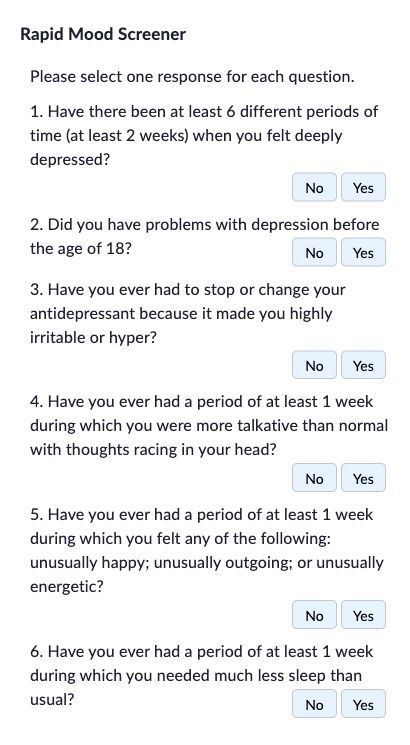
For clinics already using the PHQ-9 to screen for depression, adding the RMS can be a simple way to gather more information before the patient’s appointments.
What is the Rapid Mood Screener?
The Rapid Mood Screener is a clinically validated, patient-facing screening tool designed to help distinguish bipolar I disorder from major depressive disorders in adults with depressive symptoms. It includes just six yes-or-no questions and takes patients less than two minutes to complete.
The questions cover both past manic symptoms and features of a patient’s depression history, including when their depression began, whether they’ve experienced repeated episodes, and how they’ve responded to antidepressants.
A positive screen signals that a more comprehensive assessment for bipolar I disorder may be needed. The RMS does not provide a diagnosis, but it can help physicians identify questions to explore during the appointment.
6 yes-or-no questions
<2 minutes to complete
500+ uses this year
Over 500 uses of this form this year from over 200 different clinics.
Why screen for bipolar disorder alongside depression?
Bipolar disorder can be difficult to recognize in primary care. Patients often seek help when they’re experiencing depression, and previous periods of unusually high energy, increased activity, or reduced need for sleep may not come up during the conversation.
This can make bipolar depression difficult to distinguish from major depressive disorder. Since treatment approaches differ, understanding that history is an important part of assessing a patient’s depressive symptoms.
For busy physicians, a short questionnaire completed ahead of the visit can help bring that information into the discussion without using appointment time to collect every response.
“It takes some of the thinking out of lengthy and complex assessments for psychiatric issues, and it’s easy to integrate into what you’re already doing.”
Family physician
Making screening part of an existing workflow
In a pilot program supported by the Daymark Foundation, researchers explored how the RMS could fit into primary care. At North Toronto Medical Associates, patients booking mental health appointments were already receiving depression and anxiety questionnaires through Ocean.
Adding the RMS to that process meant physicians could receive additional information without having to remember to send another form.
That approach helped create the PHQ-9 (Extended Version with RMS) available in the Ocean Library. Rather than asking every patient to complete an additional questionnaire, the combined form uses the patient’s PHQ-9 responses to determine whether to present the RMS.
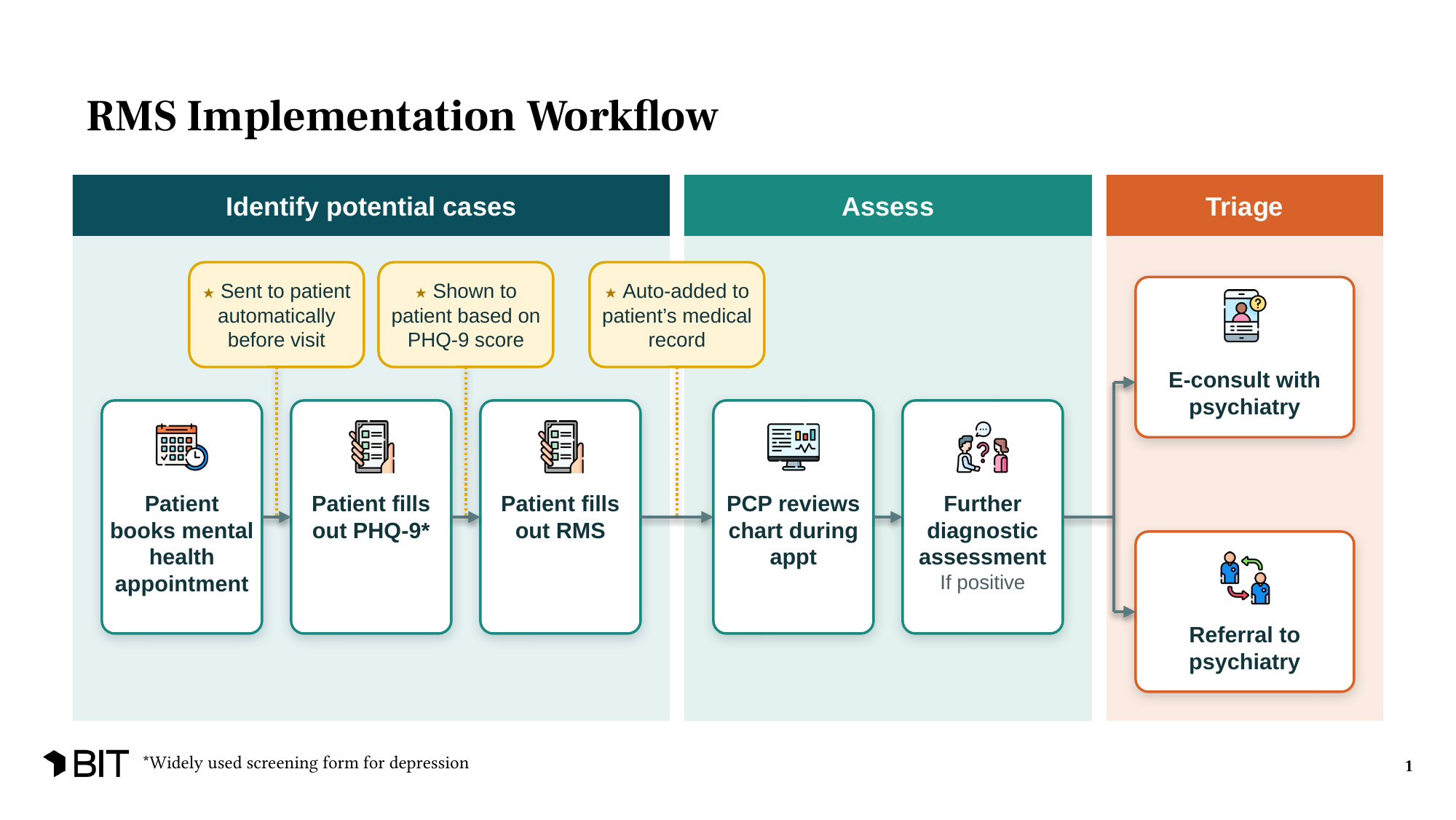
RMS implementation workflow: identify potential cases, assess, and triage. Diagram provided by BIT.
How to use the RMS with Ocean
For clinics looking to incorporate the RMS into their depression-screening workflow:
- In the Ocean Library, search for “PHQ-9 (Extended Version with RMS)”.
- Add the form to your mental health appointment workflow (like through automated reminders, or on a tablet in the waiting room) so patients can complete it before their visit.
- Patients complete the PHQ-9 first. If they score 10 or higher, the form automatically presents the RMS, unless their responses trigger the suicide-risk questionnaire*.
- Responses from both screeners sync into the patient’s chart in the EMR, ready for review and discussion.
- During the appointment, the primary care provider reviews the chart with the patient. A positive RMS screen prompts further diagnostic assessment.
- Following assessment, the provider can seek an e-consult with psychiatry or refer the patient to psychiatry, as appropriate.
*Note: If a patient’s PHQ-9 responses indicate risk of self-harm, the combined form prioritizes the suicide-risk questionnaire in place of the RMS.
You can also use the standalone RMS when you identify a reason to explore possible bipolar disorder during an appointment and send it directly to the patient.
For clinics already collecting depression questionnaires, the RMS offers a practical way to give physicians more context for their next conversation with the patient. To get started, visit Find Bipolar for step-by-step instructions on using the RMS with Ocean.